Convert Chinese to Pinyin in Google Sheets™
Turn Chinese characters into Pinyin with tone marks, tone numbers, no tones or initials — one cell or a whole column at a time with =PINYIN().
Free · Works with Simplified & Traditional Chinese · Only accesses the spreadsheet you use it in
Online Chinese to Pinyin converter
Paste Chinese text below. Everything runs in your browser.
Everything you need to work with Pinyin in spreadsheets
=PINYIN() formula
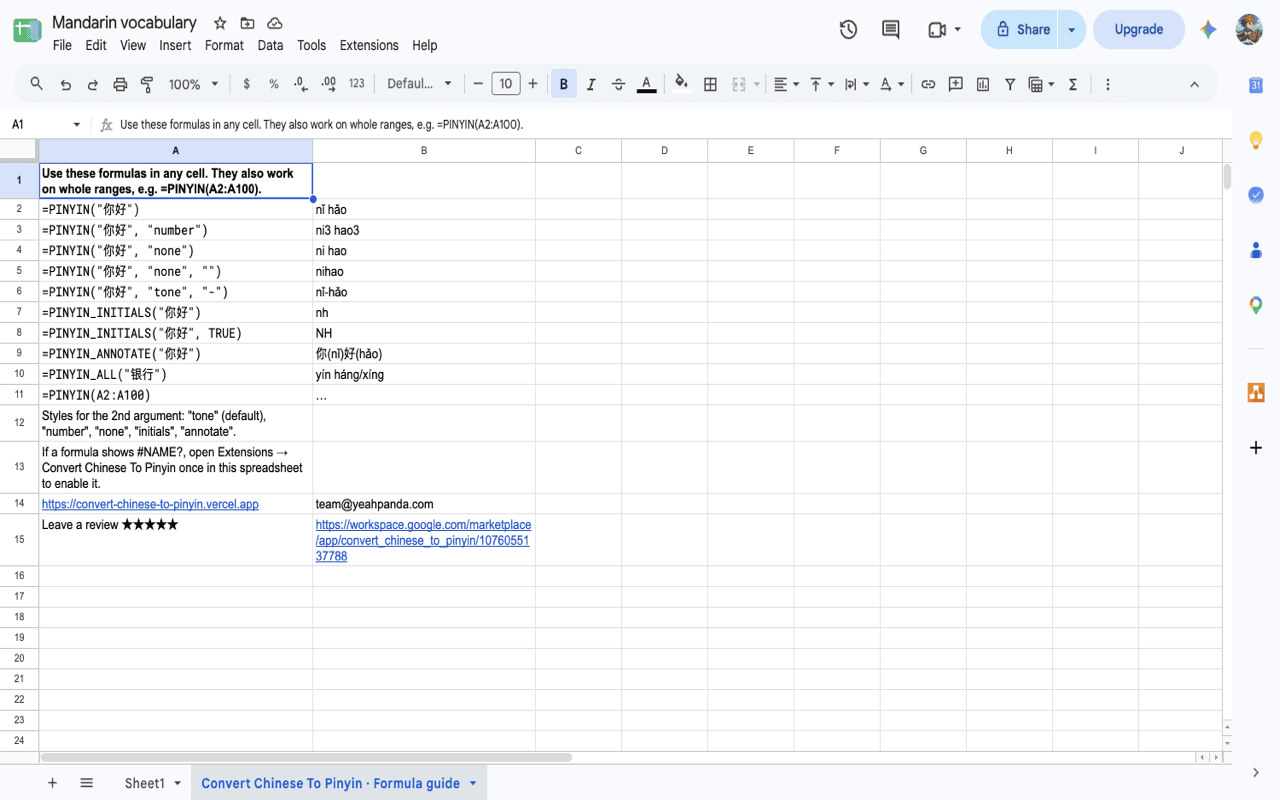
Convert a cell or a whole range: =PINYIN(A2:A100). Results update when the Chinese text changes.
5 output styles
Tone marks (nǐ hǎo), tone numbers (ni3 hao3), no tones (ni hao), initials (nh) or characters with Pinyin (你(nǐ)好(hǎo)).
Smart polyphones
Reads common words correctly: 银行 yín háng, 还钱 huán qián, 重庆 chóng qìng, 音乐 yīn yuè.
One-click bulk conversion
Select cells and pick a menu item. Pinyin goes into new columns, so your data is never overwritten.
Your language
Menus in English, 简体中文, 繁體中文, 日本語, 한국어, Español, Français and Deutsch.
Private by design
Conversion runs inside Google. The add-on can only see the spreadsheet you use it in.
Formula cheat sheet
Use these in any cell after installing the add-on.
| Formula | Result |
|---|---|
| =PINYIN("你好") | nǐ hǎo |
| =PINYIN("你好", "number") | ni3 hao3 |
| =PINYIN("你好", "none") | ni hao |
| =PINYIN("北京", "none", "") | beijing |
| =PINYIN("你好", "tone", "-") | nǐ-hǎo |
| =PINYIN_INITIALS("你好", TRUE) | NH |
| =PINYIN_ANNOTATE("中文") | 中(zhōng)文(wén) |
| =PINYIN_ALL("银行") | yín háng/xíng |
How to convert Chinese to Pinyin in Google Sheets™
- 1
Install the add-on
Open the Google Workspace Marketplace listing and click Install. It's free.
- 2
Open your spreadsheet
Go to Extensions → Convert Chinese To Pinyin to enable it in that spreadsheet.
- 3
Convert
Type =PINYIN(A2) in a cell, or select a column and choose a conversion from the menu.
Tip: =PINYIN(A2, "none", "") gives "nihao" — handy for usernames, URLs and sorting.
Who uses it
Mandarin learners
Build vocabulary lists and flashcards with Pinyin next to every word.
Teachers
Prepare word lists, quizzes and reading material for a whole class in seconds.
Translators & localization
Add pronunciation to glossaries and check names in product catalogs.
Data & operations
Romanize names and addresses, create search keys and sort Chinese lists by Pinyin initials.
Frequently asked questions
Is the add-on free?+
Yes. Convert Chinese To Pinyin is free to install and use.
Does it support Traditional Chinese?+
Yes. Both Simplified and Traditional characters are converted. Word-level polyphone handling is tuned for Simplified Chinese.
Why does my formula show #NAME?+
Open Extensions → Convert Chinese To Pinyin once in that spreadsheet. This enables the add-on's formulas for the file.
How do I get Pinyin without tones or spaces?+
Use =PINYIN(A2, "none", ""). For tone numbers use =PINYIN(A2, "number"); for initials use =PINYIN_INITIALS(A2).
How accurate is it for polyphonic characters?+
The add-on knows the correct reading for about 700 common words (银行, 重庆, 音乐, 觉得…). Rare words fall back to the most common reading; =PINYIN_ALL() lists every reading.
What data does the add-on access?+
Only the spreadsheet you use it in. Your text is processed inside Google Apps Script and never sent to our servers.
Start converting in under a minute
Join learners, teachers and teams who add Pinyin to their sheets automatically.
Get the free add-on